
Tiny World Builder
584.8K playsStart with a tiny empty island and build your own blocky village — plant grass and trees, lay roads, and unlock houses, farms, a school and more!
If the villagers in this game could write you a letter, it might look something like this:
Dear Builder, we are a little village with no home yet. We would love some green grass, a few shady trees, cozy houses and a road to walk on. A farm by the water would be nice. And please, a playground for the kids! Love, the villagers 🏠
Okay, the villagers can't really write letters. But that wish list is exactly what Tiny World Builder for kids is all about. You get a tiny, empty island made of sand, with a small blue stream running into it. There is nothing on it at all. Then, square by square, you turn it into a busy village where little blocky people walk to the shop, smoke puffs from the chimneys, and farms grow golden wheat. Everything looks like it is made of toy blocks, and you see the whole island from above, a bit like a bird flying over it.
Kids love it so much that it has been played more than 580,000 times on KidWorld, and it has a perfect rating of 5 out of 5 from more than 3,400 ratings. It is part of our Art games, because you get to design your very own place. But it also sneaks in a big thinking skill: planning. Let's find out how it works!
🏝️ An Island That Starts With Nothing
Tiny World Builder is a village-building game. Your goal is to grow a happy little town on an island. You do it by finishing 12 quests. A quest is a small job, like "Plant 6 squares of grass" or "Build 4 houses for your villagers."
At the start, the only thing you can place is 🌱 Grass. Every other piece is locked with a 🔒. Each quest you finish unlocks the next piece. So the island grows in the same order a real village might: first plants, then homes, then roads, then farms, then shops and a school.
Here is the fun twist. The buildings have needs. A house wants a road next door. A farm wants fresh water close by. A shop wants houses nearby, because who would shop there otherwise? When a building is missing something, a little thought bubble pops up over it, showing what it wishes for. So you are not just placing pieces anywhere. You are planning a town that works!
No two islands are the same. Each new island has its own bumpy shape, and the stream comes in from a different side. That means every village you build will look a little different.
🧭 Your First Few Minutes on the Island
Here is how to play Tiny World Builder on KidWorld, step by step:
Pick your level. On the "Choose Your Level" screen, tap Toddlers, Preschool, Elementary or Tweens. The game remembers your choice for next time. You can switch any time with the ⚙️ Change Level button at the top.
Read your quest. The quest card at the top says "Quest 1 of 12" and tells you what to do. A green bar fills up as you work, and a counter like "5 / 6" shows how close you are. On the right, a small picture shows which piece this quest unlocks.
Choose a piece. The row of block buttons under the island is your toolbox. Tap one to pick it. Locked pieces are gray with a 🔒. When a piece unlocks, it gets a shiny "NEW" badge.
Tap or drag on the island. Tap a square to put your piece there. Or press and drag your finger (or mouse) across the island to paint lots of squares in one go. Dragging is the fastest way to lay grass, draw a long road, or build a fence.
Watch the outline. On a computer, a white outline shows where your piece will go. A red outline means "not here." If you tap a spot that doesn't work, the square flashes red and a message tells you why, like "Trees only grow on grass."
Tap a piece again to change its look. Tap a tree to switch between four kinds: a round oak, a white birch, a pointy pine, or a pink cherry blossom. Houses come in four styles, rocks in three shapes, farms in three crops, shops in three colors, and playgrounds in two.
Fix mistakes. The 🧽 Eraser removes a piece. It also turns grass back into sand, and a lake back into grass. The ↩️ Undo button takes back your last change, and you can keep pressing it to go back up to 40 steps.
Look around. Use the round arrow buttons to turn the island left or right, so you can see behind tall buildings. Use ➕ and ➖ to zoom in and out. When you are zoomed in, pick ✋ Move and drag to slide around the island. On a keyboard, Q and E turn the island, the arrow keys slide it when you are zoomed in, and Ctrl+Z is a quick Undo.
Keep an eye on the chips. Under the quest card, little bubbles count your 👨👩👧 villagers (4 for every house), your ⭐ quests, and, on most levels, how many of your buildings are 😄 happy.
Finish your village. When you are proud of your island, tap 🏁 Finish Village. The game takes a picture of your island and shows your score out of 100, your stars, and how long you built. One tap finishes right away, so only press it when you are really done!
Play again. On the result card, tap "Build a New Island" for a fresh start, or "Choose Another Level" to try a new challenge.
Good to know: your island saves itself in your browser after every change. If you close the page and come back later, your village is still there! Each level keeps its own island. The 🏝️ New Island button starts over with a brand-new empty island right away, and so does the page's reload button. The play page also has buttons for fullscreen and for turning music and sounds on or off.
When your score is saved, it turns into ⭐ stars on your KidWorld account, so every village you finish helps you collect more.
🔓 The 12 Quests, in Order
Every level uses the same 12 quests in the same order. Only the numbers change (you will see them in the age section below). Knowing what comes next helps you plan ahead:
🌱 Grass: paint grass on the sand. Grass is special, because trees and farms can only grow on it.
🌳 Trees: plant trees on your grass.
🪨 Rocks: place rocks on sand or grass.
🏠 Houses: build homes. Each house brings 4 villagers.
🛣️ Road: draw roads. The road pieces join up by themselves, and a house turns its front door to face the road next to it.
🪵 Fence: build fences. Fence pieces next to each other get joined with wooden rails.
🌾 Farm: plant farms on grass. You can grow golden wheat, rows of leafy orange veggies, or chunky pumpkins.
🏪 Shop: open a shop where villagers buy food and toys.
🤸 Playground: build a slide and swings for the village kids.
🏫 School: build a school. This one is big! It takes up a 2×2 space, which means 2 squares wide and 2 squares long.
🌉 Bridge: build a bridge over water.
💧 Lake: dig a lake of fresh water into the land.
Each time you finish a quest, confetti rains down, a happy sound plays (if sounds are on), and a message tells you which piece you just unlocked. 🎉
💭 What the Thought Bubbles Mean
On every level except Toddlers, buildings can tell you what they need. A white thought bubble bobs over any building that is missing something. Here is what each building wants:
🏠 House: a road right next door. That means a road square touching one of its four sides. A bridge next door counts too!
🌾 Farm: fresh water within 2 squares. Fresh water means the stream or a lake. The sea around the island does not count, because sea water is salty and plants don't like salt.
🤸 Playground: a road next door, and at least 1 house within 3 squares.
🏪 Shop: a road next door, and at least 2 houses within 3 squares.
🏫 School: a road next door, and at least 3 houses within 4 squares.
When the game says "within 2 squares," it counts in every direction, even corner to corner. So a farm is happy if water is in the big 5×5 patch of squares around it.
The bubble shows one missing thing at a time, as a little picture: a road for a missing road, a 💧 drop for missing water, or a 🏠 for missing neighbors. Tip: when you pick a building in your toolbox, the line of text under the toolbox also lists everything it needs.
🗺️ Town Planning Tricks for a Happy Village
Anyone can put pieces on an island. A great builder plans first. These tips go from easy to clever, and each one tells you why it works.
Beginner Tips
Paint grass where plants will go, not everywhere. Trees and farms need grass. But houses, roads, rocks, fences, shops, playgrounds and the school can all sit on plain sand. So you don't have to cover the whole island in green. Save your time for the fun parts!
Drag instead of tap. One long drag can paint a whole strip of grass, plant a row of trees, or draw a long road. It's much quicker than tapping each square.
Use Undo before the Eraser. If you just made a mistake, ↩️ Undo puts everything back exactly as it was, even a whole dragged stroke. The Eraser is better for removing something you placed a long time ago.
Only one thing fits in a square. If a spot says "This spot is taken," erase what is there first. You can't stack a tree on a road!
Turn the island when things hide. Tall houses and trees can cover squares behind them. Tap a turn button to see the hidden side, then tap right where you want.
Build Your Village Around a Main Street
This is the biggest secret of the whole game. Draw one long road through the middle of your land, then line houses up on both sides of it, like a real street.
Why does this work so well? Every house touching the road is happy. And on most levels, the Road quest doesn't count road pieces at all. It counts houses that have a road next door. One road square can help two houses at once: one above it and one below it.
Example 1: the two-sided street. Say you are on Elementary, and the Road quest says "Give 3 houses a road next door." Try this:
Draw a straight road 3 squares long.
Put one house above the first road square and one house below it.
Put a third house above the third road square.
That's 3 happy houses with only 3 road squares. Quest done! And your villagers start walking up and down the road.
Save a 2×2 Spot for the School
The school is the only piece that takes up 4 squares. If your island is already full of trees and rocks when it unlocks, you may see this message: "A school needs a free 2×2 space of land. Plan some room!"
Example 2: planning the school early. While you build your main street, leave an empty 2×2 patch of land right next to the road, near the end where your houses are. Later, when the school unlocks, it slides right in. It touches the road, and it wants 3 houses within 4 squares, so the houses on your street already count!
If you forgot to save room, don't worry. Use the Eraser on a tree or a rock to clear space. Removing a tree won't take back a quest you already finished.
Put Farms by the Stream (the Lake Comes Last!)
Here is a sneaky one. The Farm quest is quest 7, but the Lake doesn't unlock until quest 12, the very last one. On Elementary and Tweens, the Farm quest only counts farms near fresh water. So when your farms are due, the only fresh water on the island is the stream!
Example 3: finding a good farm spot. Say the stream runs across your island in a straight line. Count the rows of land next to it:
A farm in the row right beside the stream: happy. 😄
A farm two rows away: still happy, because 2 squares is close enough.
A farm three rows away: a 💧 bubble pops up. Too far!
So paint a strip of grass along the stream first, then plant your farms there. The fences you built in quest 6 look great around them! Later, when you can dig lakes, you can make new farm spots anywhere by digging a lake beside them.
Make Your Shop and Playground a Neighborhood Place
The shop needs 2 houses within 3 squares, and the playground needs 1. If you put them far away at the edge of the island, they will feel lonely and show a 🏠 bubble.
Example 4: the corner shop. At the end of your main street, put the shop so it touches the road. Now count to the two nearest houses. If each one is 3 squares away or closer (counting corner to corner as 1), the shop is happy. The playground is even easier: it only needs one house close by, so tuck it right between two houses.
Bridges: Crossings and Piers
Bridges go on water: over the stream, over a lake, or into the sea. A sea bridge must start at the shore (or next to another bridge), so you can build a little pier sticking out into the sea. The bridge turns by itself to match the land on each side.
Example 5: one road, two bridges. On Elementary you need 2 bridge pieces. The stream is narrow, so a crossing usually takes just one piece. Try this: draw a road up to the stream, put a bridge across, and continue the road on the other side. Then do it again a few squares further along, and join the two roads on the far side. Now your villagers can walk in a big loop over both bridges! And because a bridge counts as a road for the house next to it, houses beside your bridges are happy too.
Clever Tips for Big Builders
Look ahead at the "Unlocks" picture. The quest card always shows the next piece. If it's the school, clear some room now.
Build houses in a cluster. Shops, playgrounds and the school all want houses nearby. Houses spread all over the island help nobody.
Watch the 😄 chip. It shows what share of your buildings are happy. If it drops to 🙂 or 😟, look for the thought bubbles and fix them.
Don't place a building just to decorate. On most levels, an extra farm far from water or a house with no road lowers your happy score. If you want decoration, use trees, rocks and fences. They have no needs!
🏅 Where Your 100 Points Come From
When you tap Finish Village, your score is made of three parts:
Quests (up to 60 points): 5 points for each of the 12 quests you finished.
Happy buildings (up to 25 points): the share of your houses, farms, shops, playgrounds and school that have everything they need. If all of them are happy, you get all 25. On Toddlers, where there are no needs, any building earns the full 25.
Variety (up to 15 points): how many of the 12 kinds of pieces are on your island. Grass and lake count too! Have at least one of each to get all 15.
The result card then gives you 1 to 5 stars. A score of 90 or more earns all 5 stars and the title "Amazing Village!" (when all 12 quests are done). The card also shows your villagers, your happy percent, your kinds of pieces, and your building time. There is no timer, though. Taking your time never costs you points.
Quick check: in one of our test villages, all 12 quests were done (60 points) and all 12 kinds were there (15 points). But 2 of the 16 buildings were grumpy: a farm too far from water and a house with no road. That made 14 out of 16 happy, which is 22 points. Total: 97 out of 100. Fix those two bubbles and it's a perfect 100!
🎒 Tiny World Builder for Kids, Level by Level
The level changes how big the island is, how many pieces each quest asks for, and how the needs work. Here is what to expect.
🐣 Toddlers (ages 2–4): Tap and Watch It Grow
The island is the smallest, 16 squares across, and the quests are short: 6 squares of grass, 3 trees, 2 houses, and just 4 road pieces to draw anywhere. There are no needs and no thought bubbles, so any building makes the villagers happy. Tiny World Builder for toddlers is a gentle "tap and see it grow" game, and it's lovely to play on a grown-up's lap. A parent can say "Let's put a tree here!" and let the child tap.
🎨 Preschool (ages 4–6): Meet the Thought Bubbles
The island grows to 18 squares across, and the quests grow a bit too: 10 squares of grass, 4 trees, 3 houses, 2 bridge pieces and a lake 3 squares big. Now thought bubbles appear, but the quests still count every building, happy or not. That makes Tiny World Builder for preschoolers a friendly first taste of planning: kids see the bubbles, learn what houses and farms want, and fix them if they like. The Road quest now asks for 2 houses with a road next door.
📐 Elementary (ages 6–10): Needs Start to Count
Now the needs really matter. The island is 20 squares across. The Farm, Shop, Playground and School quests only count buildings whose needs are all met. You'll need 16 grass squares, 5 trees, 4 houses, 3 houses with a road next door, 6 fence pieces, 2 happy farms, 2 bridge pieces and a lake 4 squares big. Tiny World Builder for elementary kids is where the main-street and farm-by-the-stream tricks above really shine.
🚀 Tweens (ages 10–12): The Master Planner Island
The biggest island, 24 squares across, with the biggest targets: 24 squares of grass, 6 trees, 5 houses, 5 houses with a road next door, 8 fence pieces, 3 happy farms and 3 bridge pieces. Needs are required, just like Elementary. Tiny World Builder for tweens is a true town-planning puzzle. Can you fit three happy farms along one stream, build three bridges, and still get every building to 😄?
🌻 What Growing a Village Grows in You
While kids are busy making their island pretty, they are also practicing some big skills:
Thinking one step ahead. Leaving a 2×2 space for a school that isn't unlocked yet, or putting farms by the stream before lakes exist, is real planning. Kids learn to ask, "What will I need later?"
How a town works. Why do houses need roads? Why do farms need water? Why is a shop near homes? Kids discover the reasons by seeing the thought bubbles, not by being told.
Counting and space. "Is this farm 2 squares from the water or 3?" Kids count squares, compare distances, and picture shapes like a 2×2 block. That's early math, hidden inside play.
Nature facts. Plants need soil and fresh water. Sea water is salty. Little facts like these stick when a farm won't be happy next to the sea.
Creativity with a purpose. There are four kinds of trees, four house styles, three crops and more. Every village looks different, and kids make choices that are all their own.
Calm problem solving. A grumpy bubble is not a failure. It's a puzzle. Kids learn to look, think, and fix, with Undo and the Eraser always ready.
A Note for Grown-Ups
Tiny World Builder is a calm, safe game. There are no monsters, no losing, no lives and no timer. Nothing bad ever happens to the villagers; they just walk around, and a building with a missing need only shows a friendly bubble. Inside the game there is no chat and nothing to buy. The island saves in your own browser, so a child can come back to the same village later. It's a great game to play together: ask your child to explain why a farm has a water drop over it, and you'll hear their planning in their own words.
So grab your grass, pick a level, and start your very own island today. Your villagers are waiting for their new home! Tiny World Builder for kids is ready to play right here on KidWorld. 🏝️🏡
🖼️ See the Game in Action
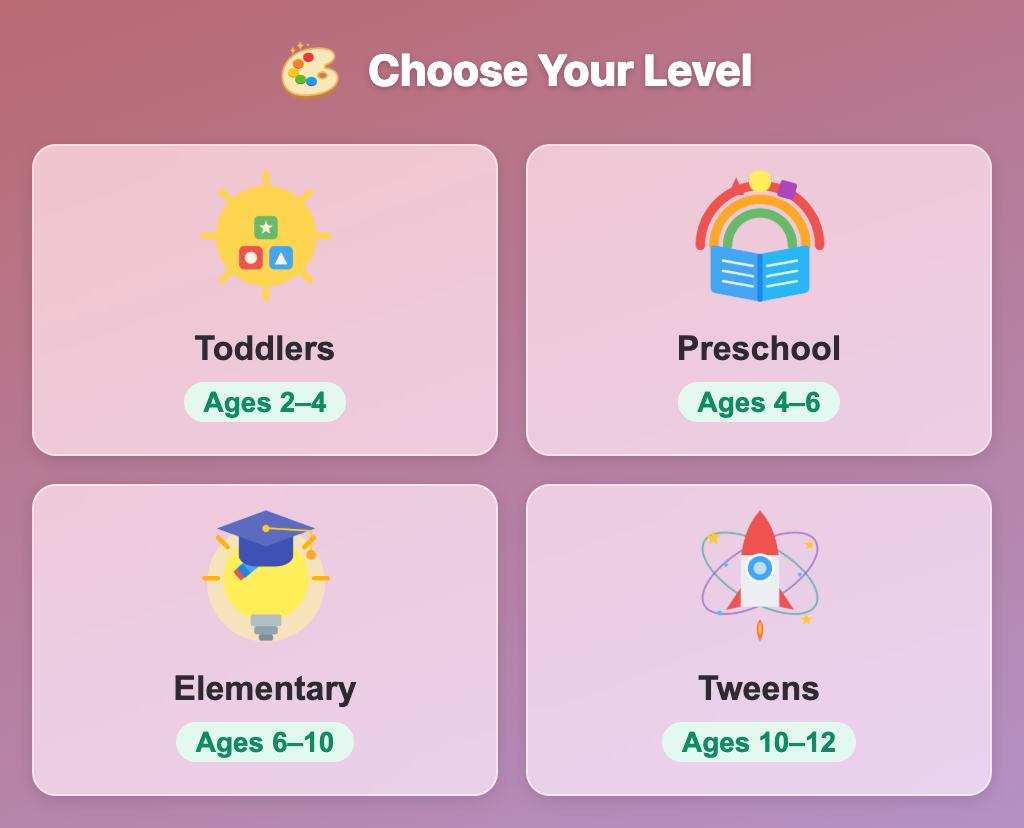
The Choose Your Level screen in Tiny World Builder for kids, with Toddlers, Preschool, Elementary and Tweens cards
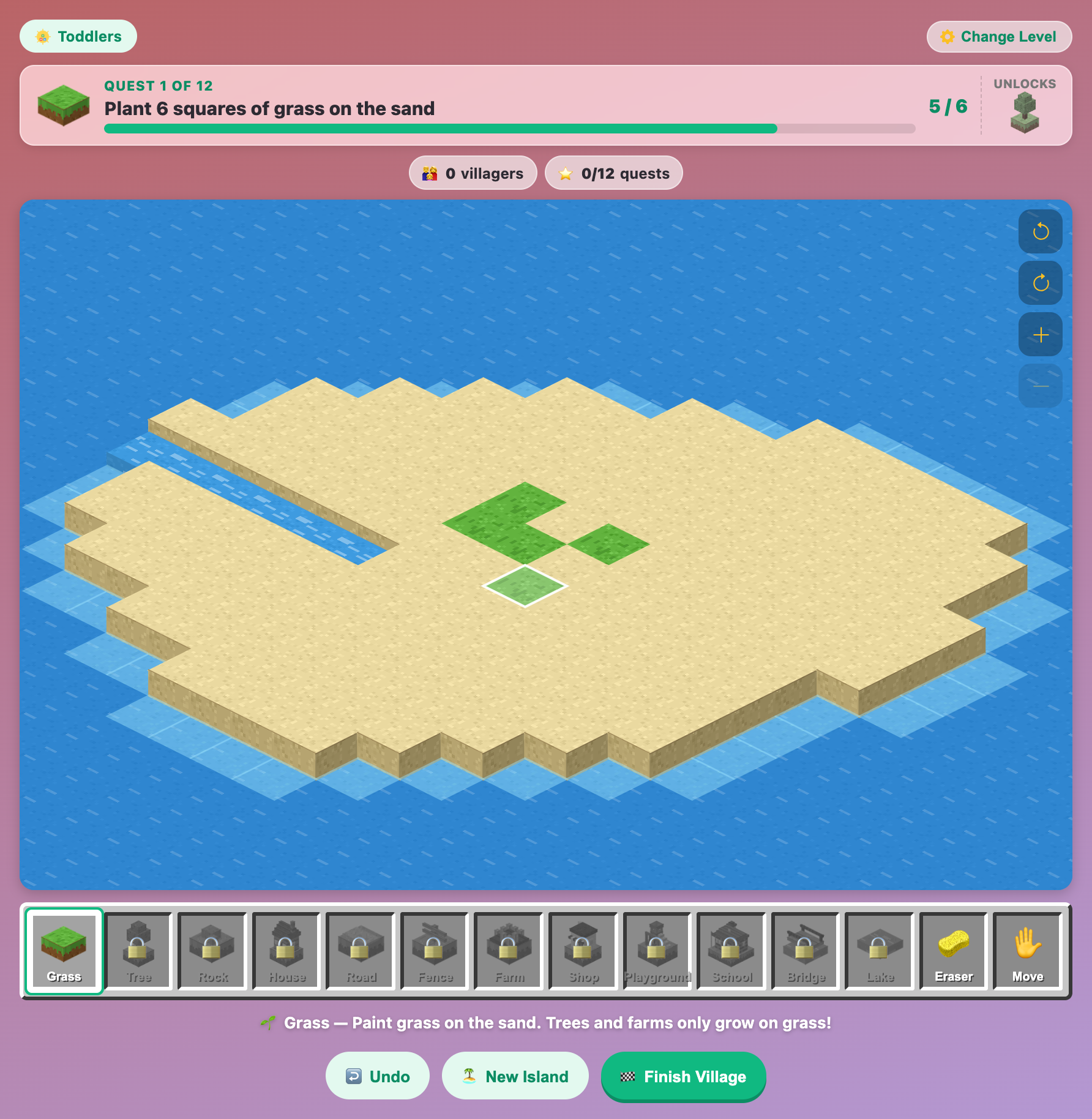
An empty sand island at the Toddlers level of Tiny World Builder with the first few green grass squares painted in
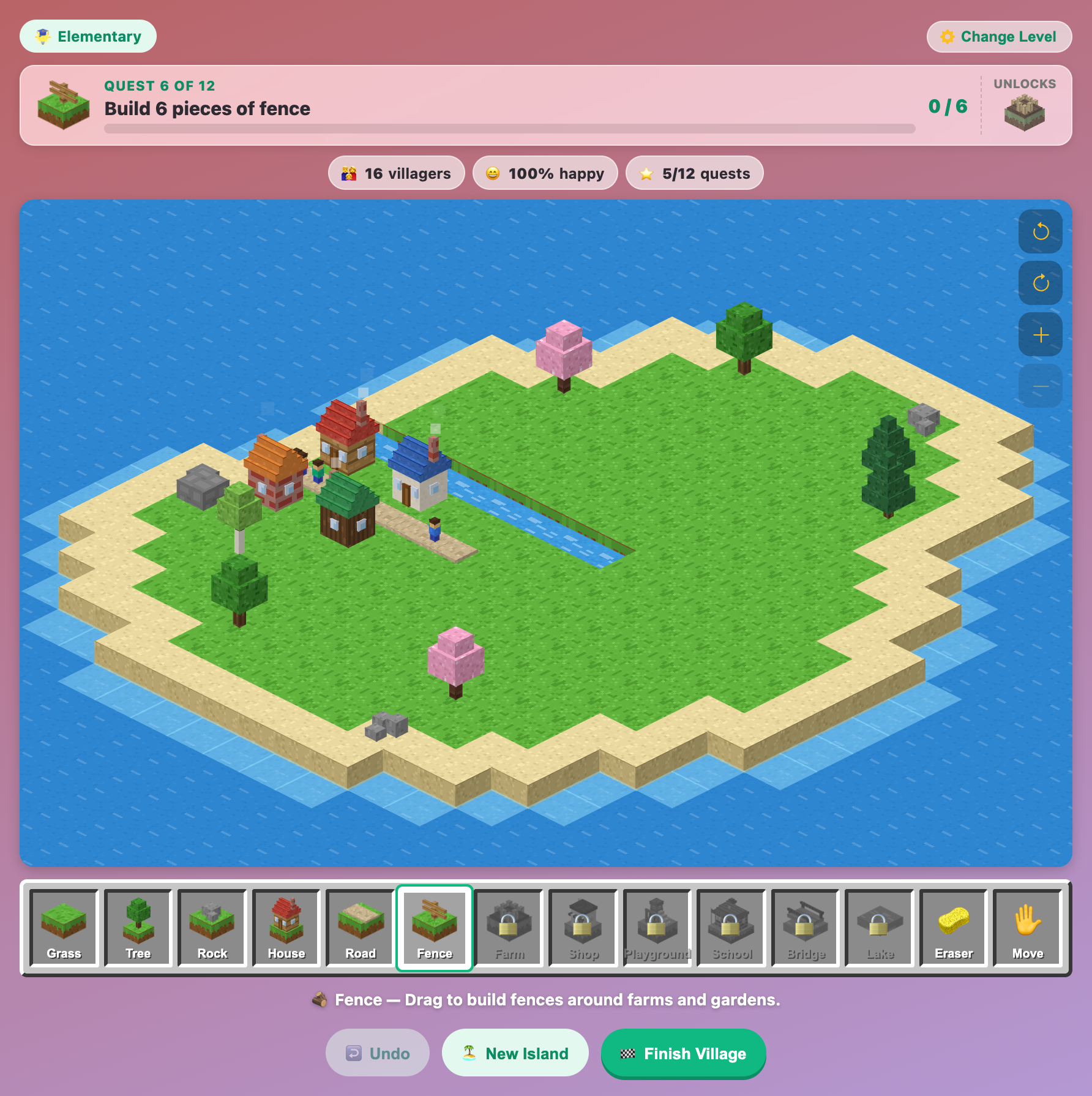
A young village in Tiny World Builder for elementary kids with four houses, a short road, trees and rocks
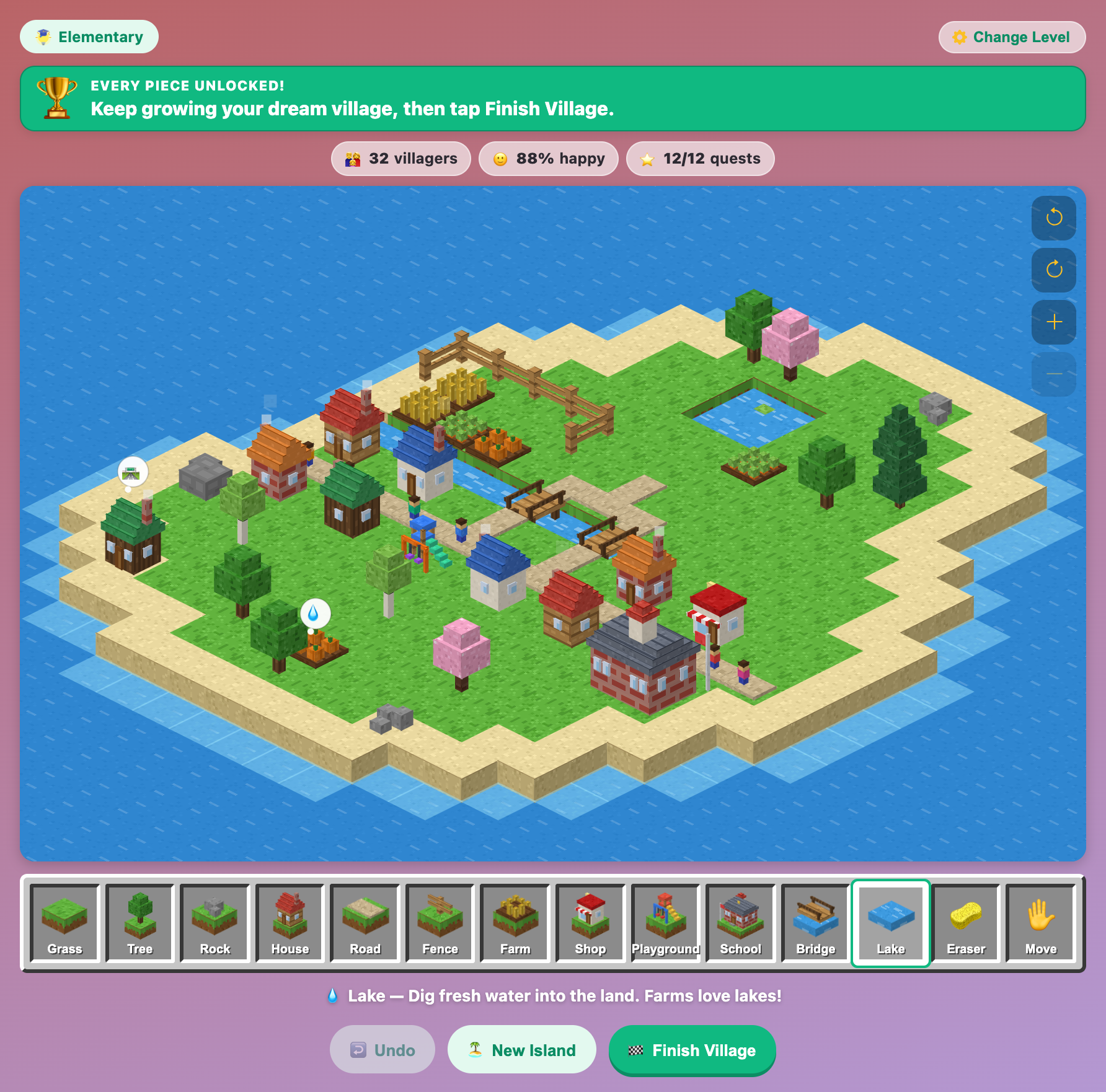
A finished island village in Tiny World Builder with houses, farms, a school, a shop, two bridges, a lake and two thought bubbles
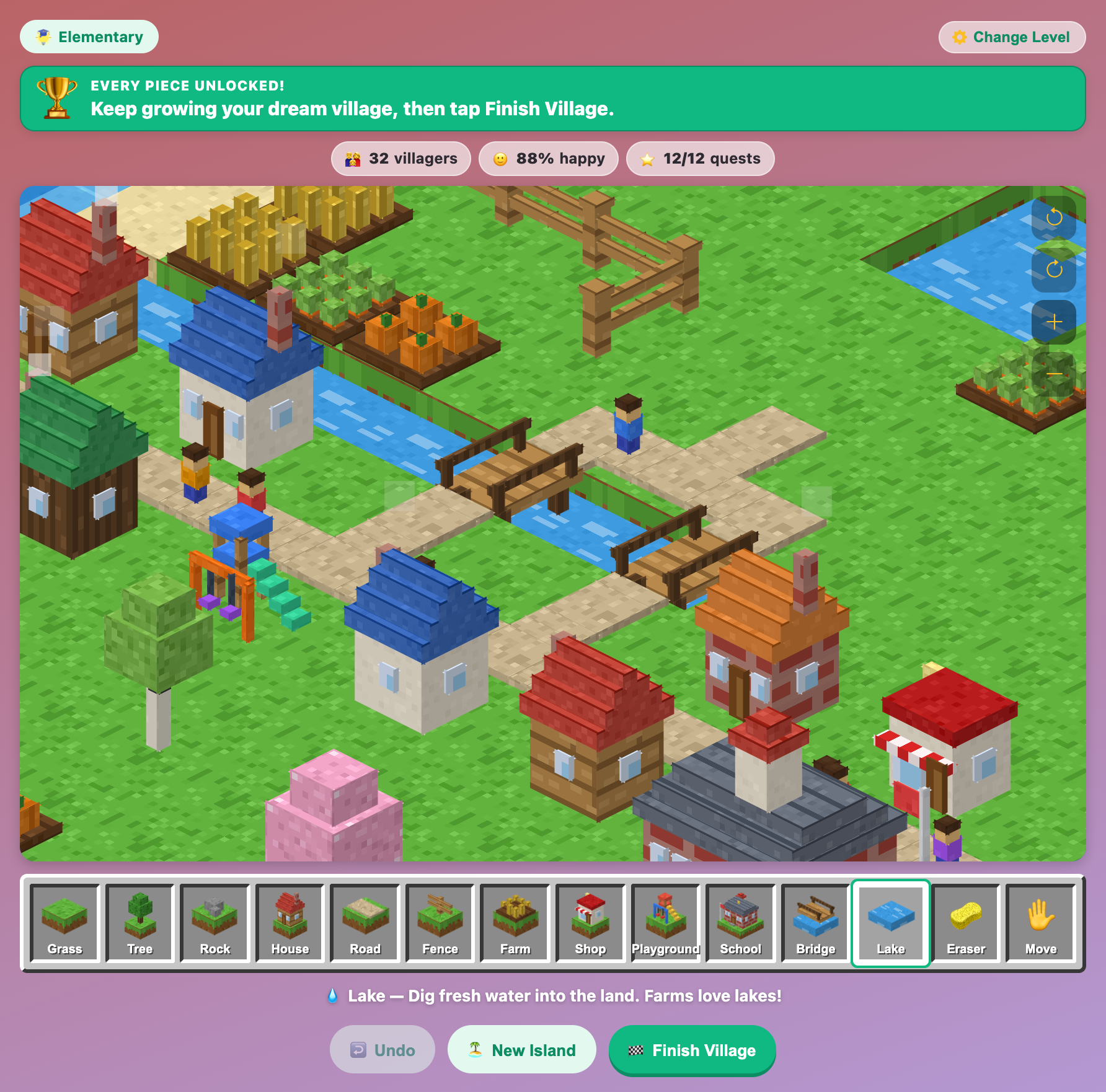
A zoomed-in view of Tiny World Builder with blocky villagers walking over wooden bridges past houses and a playground
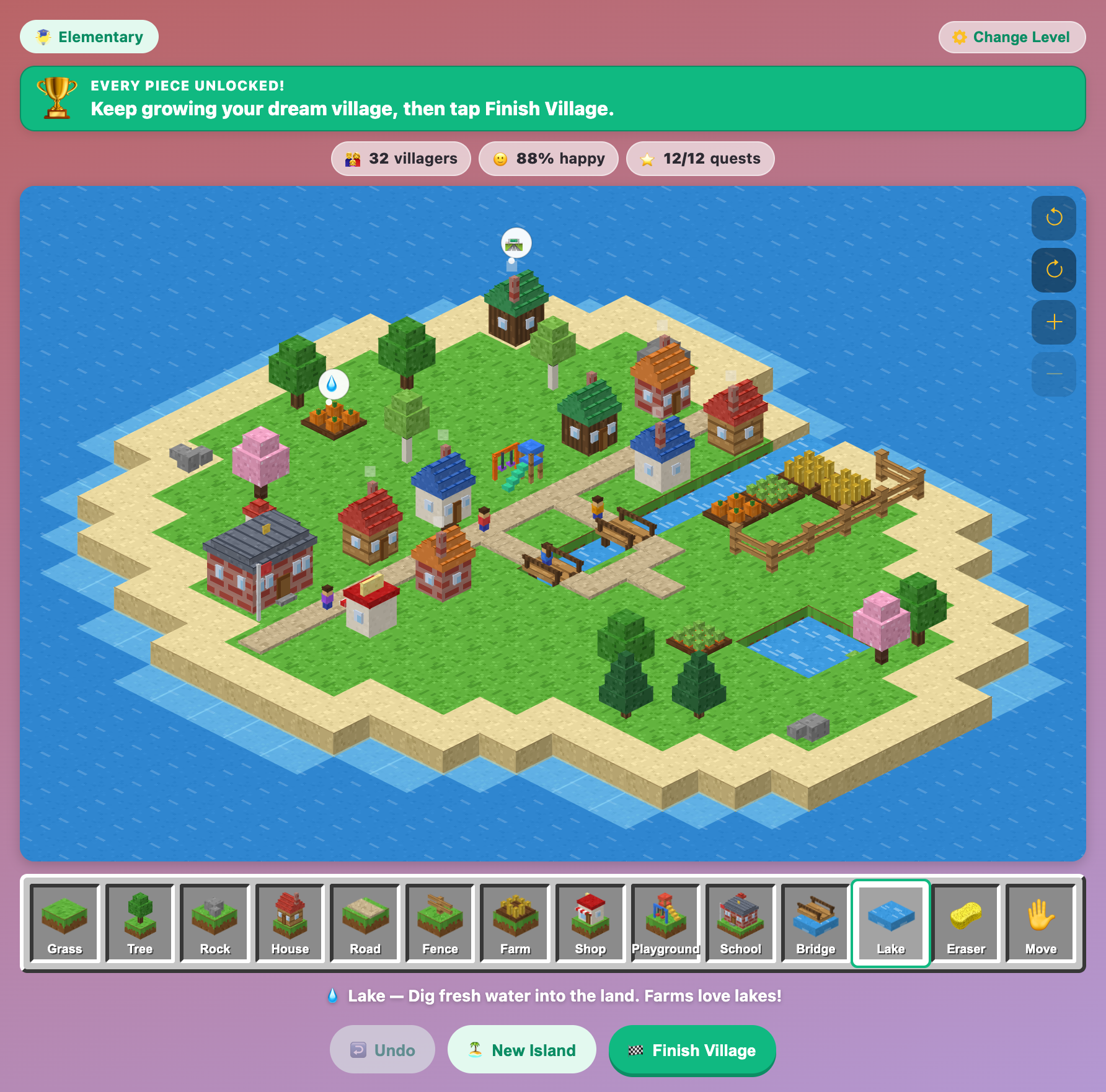
The same Tiny World Builder village turned to a new angle, showing the fenced farms and the lake from the other side
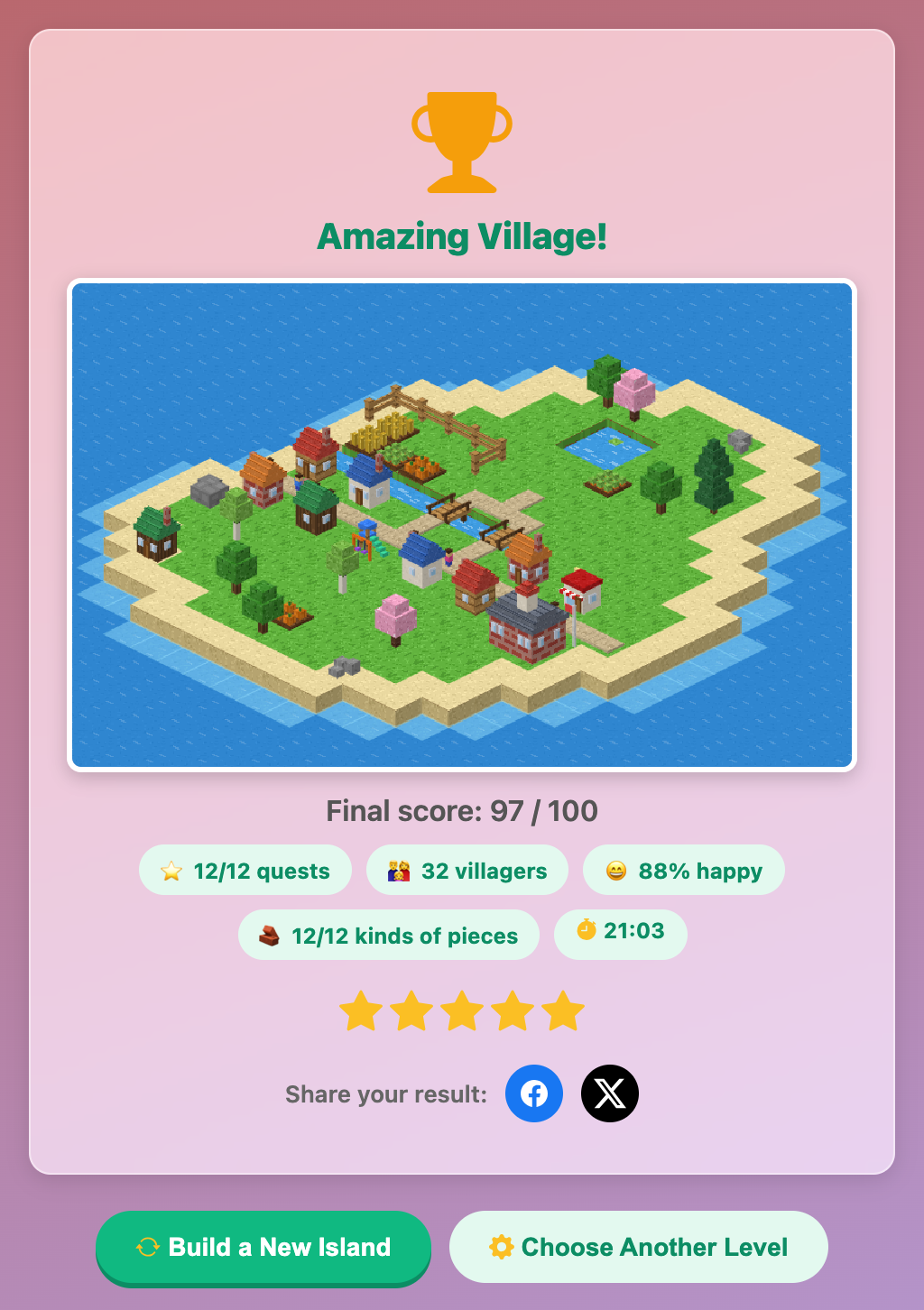
The Amazing Village result card in Tiny World Builder with a picture of the island, a score of 97 out of 100 and five stars
More Art Games
 1.8M plays
5.0
1.8M plays
5.0
Color & Draw
A free-drawing canvas with colors and brush sizes to unleash your creativity.
 154.5K plays
4.9
154.5K plays
4.9
Mood Palette
Decide which color best fits a mood or theme before time runs out.
 174.6K plays
4.9
174.6K plays
4.9
Color Mixing
Look at two paint colors and pick which color they mix together to make.
 483.9K plays
4.9
483.9K plays
4.9
Build My House
Dig wood, stone and sand, craft blocks and furniture, then build and decorate your very own house in a blocky world!
Most Played Games
1.8M plays
5.0
Color & Draw
A free-drawing canvas with colors and brush sizes to unleash your creativity.
 59.2K plays
5.0
59.2K plays
5.0
Recycling Sort
Sort everyday items into the Recycle, Compost, or Trash bin before time runs out!
 365.5K plays
4.9
365.5K plays
4.9
Tic-Tac-Toe
Play a game of Tic-Tac-Toe against the computer and see if you can outsmart it.
 1.1M plays
4.9
1.1M plays
4.9
Chess
Play the classic game of chess against the computer or a friend, with FIDE time controls, hints, and undo.
Comments (50)